openwrt 使用 sing-box(tun 模式)进行路由代理
前言
家里的软路由一直用的 openclash, 稳定了两年了, 但是 openclash 我的配置一直导致国内网站较慢(国内均为走代理), 不论是 fakeip 还是 Redir-host 模式, 一直在想办法解决国内慢的问题, 但始终不能结局.并且不支持 vless 让我很难受,(meta 说支持了但我自建的在 clash 上没 ping 通过).sing-box 很早我就有所关注, 用过 Android app, 但因为 openwrt 一直没有配套的 luci app, 配置看起来有那么麻烦一直没有在 openwrt 用, 这两天看了油管大佬的视频和 sing-box 的官方文档, 自己也成功在 openwrt 用 sing-box 代理了全部设备的流量, 并且速度很快, 规则设置起来也不太麻烦, 所幸也来写一篇像我这样什么都不懂的人适用的教程.
sing-box 进行网络代理有两种方法 tproxy 和 tun 模式, tproxy 需要修改 iptables/nftables.tun 模式需要创建网络接口和防火墙, 本教程使用 tun 模式
如果需要使用tproxy模式,推荐直接使用shellcrash管理.
安装 sing-box
openwrt 可以使用如下命令一键安装 sing-box(不是 alpha 版本)
如果 iptables-nft 安装失败没有影响(至少 tun 模式没有)
opkg install kmod-inet-diag kmod-netlink-diag kmod-tun iptables-nft
opkg install sing-box
配置 sing-box
sing-box 最重要的就是配置了, 小白可能一看到密密麻麻的配置就头疼, 但是阅读一遍也就可以明白个七七八八了, 我这里给出我的配置, 是根据不良林大佬的基础配置改的, 分流十分基础(但是十分好用), 我添加了 steam 和 epic 的规则, 更多规则还要你们自己去发现/编写.
(之后我应该会创建配置模板)
我写了一个根据模板转换 clash 订阅-singbox 配置文件的项目, 可以尝试使用
AprDeci/clash2singbox: clash 订阅, 节点转换 sing-box (github.com)
使用 opkg 安装后在 etc/sing-box/ 文件夹下创建 config.json
{
    "log": {
        "disabled": false,
        "level": "info",
        "timestamp": true
    },
    "dns": {
        "servers": [
            {
                "tag": "default-dns",
                "address": "223.5.5.5",
                "detour": "direct-out"
            },
            {
                "tag": "system-dns",
                "address": "local",
                "detour": "direct-out"
            },
            {
                "tag": "block-dns",
                "address": "rcode://name_error"
            },
            {
                "tag": "google",
                "address": "https://dns.google/dns-query",
                "address_resolver": "default-dns",
                "address_strategy": "ipv4_only",
                "strategy": "ipv4_only",
                "client_subnet": "1.0.1.0"
            }
        ],
        "rules": [
            {
                "outbound": "any",
                "server": "default-dns"
            },
            {
                "query_type": "HTTPS",
                "server": "block-dns"
            },
            {
                "clash_mode": "direct",
                "server": "default-dns"
            },
            {
                "clash_mode": "global",
                "server": "google"
            },
            {
                "rule_set": "cnsite",
                "server": "default-dns"
            }
        ],
        "strategy": "ipv4_only",
        "disable_cache": false,
        "disable_expire": false,
        "independent_cache": false,
        "final": "google"
    },
    "inbounds": [
        {
            "type": "tun",
            "tag": "tun-in",
            "interface_name": "tun0",
            "inet4_address": "172.19.0.1/30",
            "mtu": 9000,
            "gso": true,
            "auto_route": true,
            "stack": "system",
            "sniff": true,
            "sniff_override_destination": false
         }
    ],
    "outbounds": [
			  {
			  "type": "direct",
			  "tag": "direct-out",
			  "routing_mark": 100
			},
			{
			  "type": "block",
			  "tag": "block-out"
			},
			{
			  "type": "dns",
			  "tag": "dns-out"
			},
			{
			  "type": "urltest",
			  "tag": "自动选择",
			  "outbounds": [
				"香港",
				"日本",
				"美国"
			  ]
			},
			{
			  "type": "selector",
			  "tag": "手动选择",
			  "outbounds": [
				"direct-out",
				"block-out",
				"自动选择",
				"香港",
				"日本",
				"美国"
			  ],
			  "default": "自动选择"
			},
			{
			  "type": "selector",
			  "tag": "GLOBAL",
			  "outbounds": [
				"direct-out",
				"香港",
				"日本",
				"美国"
			  ],
			  "default": "手动选择"
			},
			{
			  "type": "shadowsocks",
			  "tag": "香港",
			  "routing_mark": 100,
			  "server": "abc.com",
			  "server_port": 10001,
			  "password": "fdc43e321a",
			  "method": "aes-128-gcm"
			},
			{
			  "type": "shadowsocks",
			  "tag": "日本",
			  "routing_mark": 100,
			  "server": "abc.com",
			  "server_port": 10002,
			  "password": "fdc43e321a",
			  "method": "aes-128-gcm"
			},
			{
			  "type": "shadowsocks",
			  "tag": "美国",
			  "routing_mark": 100,
			  "server": "abc.com",
			  "server_port": 10003,
			  "password": "fdc43e321a",
			  "method": "aes-128-gcm"
			}
    ],
    "route": {
        "rules": [
            {
                "inbound": "dns-in",
                "outbound": "dns-out"
            },
            {
                "protocol": "dns",
                "outbound": "dns-out"
            },
            {
                "protocol": "quic",
                "outbound": "block-out"
            },
            {
                "clash_mode": "direct",
                "outbound": "direct-out"
            },
            {
                "clash_mode": "global",
                "outbound": "GLOBAL"
            },
            {
                "rule_set": [
                    "cnip",
                    "cnsite",
                    "gamecdn"
                ],
                "outbound": "direct-out"
            }
        ],
        "rule_set": [
            {
                "type": "remote",
                "tag": "cnip",
                "format": "binary",
                "url": "https://github.com/MetaCubeX/meta-rules-dat/raw/sing/geo-lite/geoip/cn.srs",
                "download_detour": "自动选择"
            },
            {
                "type": "remote",
                "tag": "cnsite",
                "format": "binary",
                "url": "https://github.com/MetaCubeX/meta-rules-dat/raw/sing/geo-lite/geosite/cn.srs",
                "download_detour": "自动选择"
            },
            {
                "type":"remote",
                "tag":"gamecdn",
                "format":"source",
                "url":"https://raw.githubusercontent.com/AprDeci/singbox-ruleset/main/game-cdn.json",
                "download_detour":"自动选择"
            }
        ],
        "auto_detect_interface": true,
        "final": "手动选择"
    },
    "experimental":{
        "cache_file": {
            "path": "cache.db",
            "cache_id": "cache_id",
            "store_fakeip": true,
            "enabled": true
        },
            "clash_api": {
            "external_controller": "192.168.8.1:9090",
            "external_ui": "ui",
            "external_ui_download_url": "",
            "external_ui_download_detour": "",
            "secret": "",
            "default_mode": ""
        }
    }
}
我为小白具体讲解几个关键点, 更多配置信息, 还需要去官方文档查看.
tproxy 和 tun 模式最重要的就是 inbounds 的配置, 像我给出的 inbounds 既是创建 tun 虚拟接口, 取名为 “tun0”.(其余内容无需修改)
dns.servers 即为指定 singbox dns 服务器地址, “google” 即为远程 dns 地址, 可以自行修改
route.rules 即为规则指定 outbounds, 这里的 outbounds 即为 clash 中的策略组和节点.
route.rule_set 即为规则集, 可以是 inline 和远程或本地模式
experimental.cache_file 用来缓存 dns 记录
experimental.clash_api 是开启 clash 风格 api, sing-box 默认 meta-yacd 面板.开启后浏览器输入 experimental.clash_api.external_controller 的地址即可跳转到面板修改节点
你需要做的
你需要做的就是将自己的节点信息填写在 outbounds 里, 并且修改策略组包含的节点信息.(可以先一键转换复制到里面, 也可以直接使用转换的配置, 修改 inbounds 等其他配置即可)
启动 sing-box
配置完成后输入
sing-box check -c /etc/sing-box/config.json倘若没有错误输出, 使用如下命令即可启动 sing-box(这时还无法代理局域网设备)
sing-box run -c /etc/sing-box/config.json输入如下命令设置 sing-box 自启动
/etc/init.d/sing-box enable
/etc/init.d/sing-box start
修改/etc/init.d/sing-box 文件(opkg 安装会自动创建, 其他方法请自行创建), 直接覆盖
#!/bin/sh /etc/rc.common
#
# Copyright (C) 2022 by nekohasekai <contact-sagernet@sekai.icu>
#
# This program is free software: you can redistribute it and/or modify
# it under the terms of the GNU General Public License as published by
# the Free Software Foundation, either version 3 of the License, or
# (at your option) any later version.
#
# This program is distributed in the hope that it will be useful,
# but WITHOUT ANY WARRANTY; without even the implied warranty of
# MERCHANTABILITY or FITNESS FOR A PARTICULAR PURPOSE.  See the
# GNU General Public License for more details.
#
# You should have received a copy of the GNU General Public License
# along with this program. If not, see <http://www.gnu.org/licenses/>.
#

START = 99
USE_PROCD = 1

#####  ONLY CHANGE THIS BLOCK  ######
PROG =/usr/bin/sing-box
RES_DIR =/etc/sing-box/ # resource dir / working dir / the dir where you store ip/domain lists
CONF =./config.json   # where is the config file, it can be a relative path to $RES_DIR
#####  ONLY CHANGE THIS BLOCK  ######

start_service() {
  sleep 10
  procd_open_instance
  procd_set_param command $PROG run -D $ RES_DIR -c $CONF

  procd_set_param user root
  procd_set_param limits core = "unlimited"
  procd_set_param limits nofile = "1000000 1000000"
  procd_set_param stdout 1
  procd_set_param stderr 1
  procd_set_param respawn "${respawn_threshold:-3600}" "${respawn_timeout:-5}" "${respawn_retry:-5}"
  procd_close_instance
  iptables -I FORWARD -o tun+ -j ACCEPT
  echo "sing-box is started!"
}

stop_service() {
  service_stop $PROG
  iptables -D FORWARD -o tun+ -j ACCEPT
  echo "sing-box is stopped!"
}

reload_service() {
  stop
  sleep 5s
  echo "sing-box is restarted!"
  start
}
添加接口和防火墙
启动 sing-box 后, 还需添加网络接口(仅 tun 模式), 如图设置, 设备名称和配置中 tun 设备名称一致

防火墙添加区域
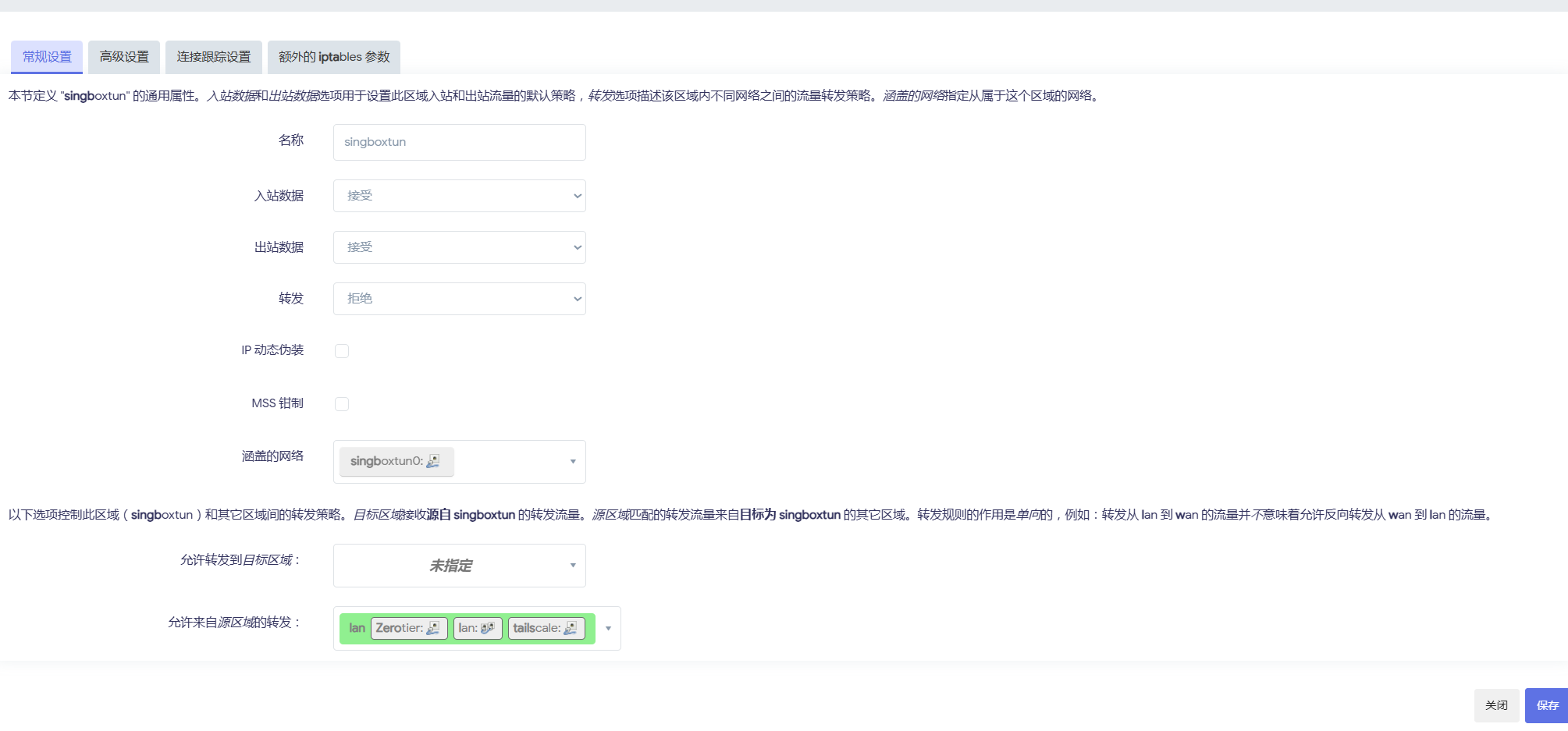
再设置 lan 区域转发 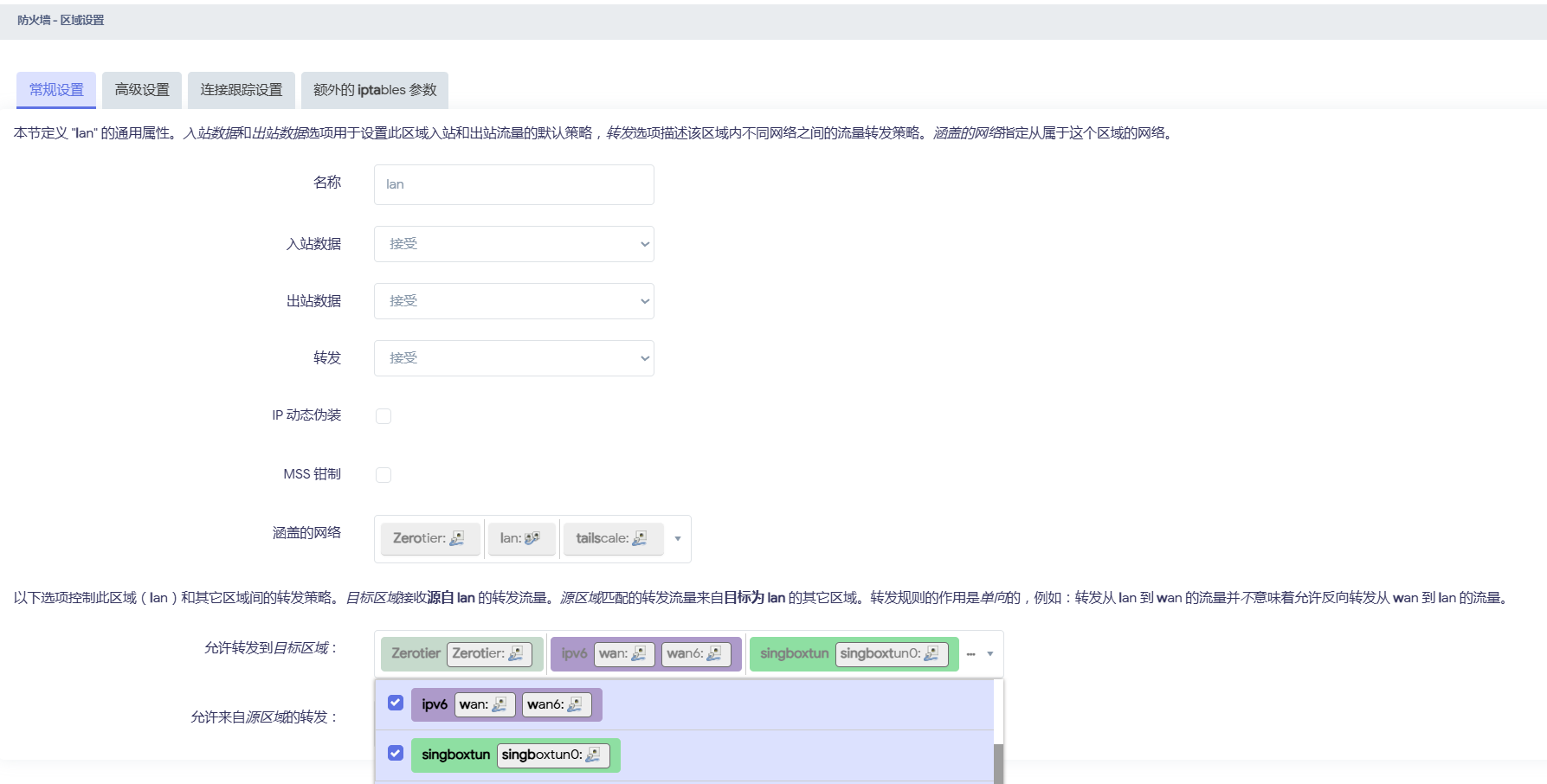
一切都设置完之后, 你的局域网设备就都被代理了
参考文章
How to Run · rezconf/Sing-box Wiki (github.com)
【配置分享】sing-box 全配置分享、Proxies URI;Selector 详细配置使用 (youtube.com)